Client work · 2017 · for TouchTap

School EventPay

No more cash or checks sent to school.

Parents paid for field trips and fees and signed permission slips from their phones, and schools saw every payment land in their own books. I built the web app for school staff and the API behind the parents' apps, from May 2017, when it was still called School PayIt.

I built
Rails Web App & API
With
Ruby, Rails, Stripe Connect, Sidekiq, PostgreSQL
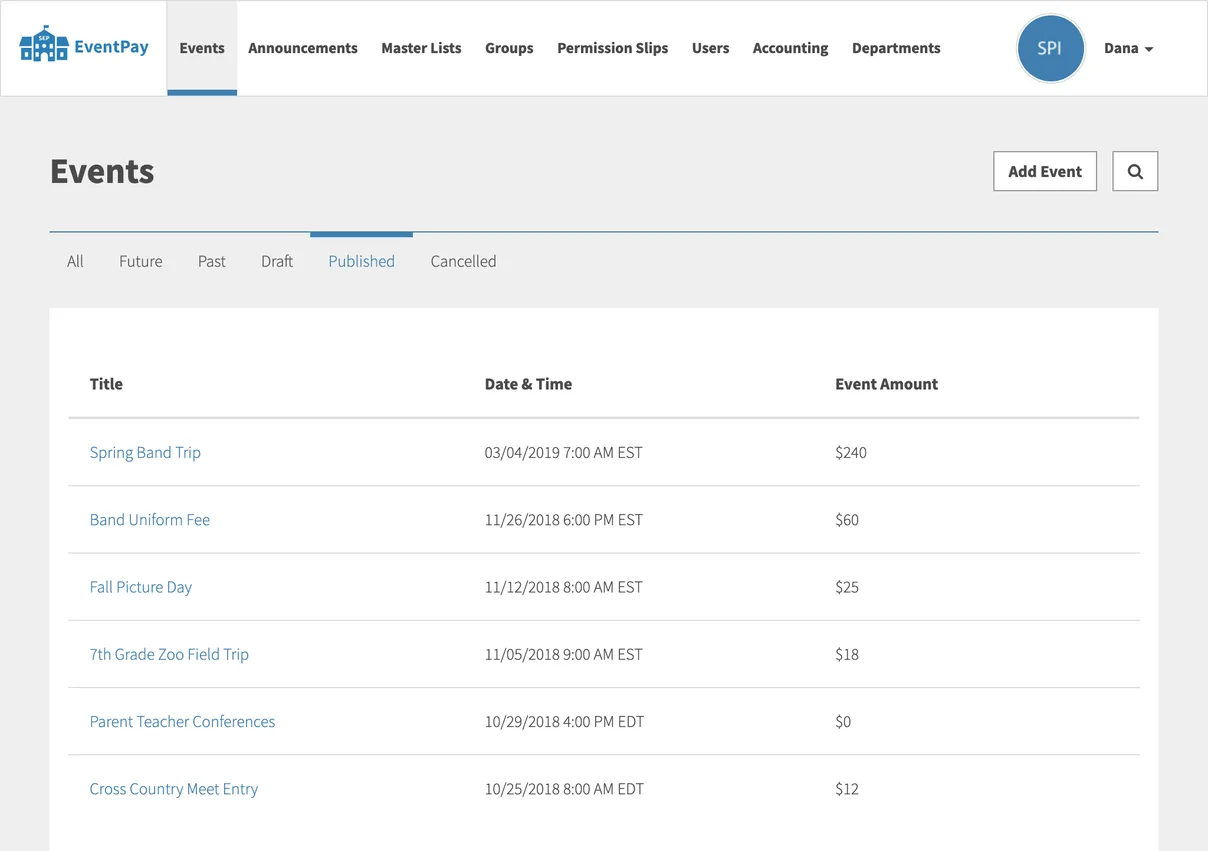
The web app's published events on demo data: a Spring Band Trip at $240, a Band Uniform Fee at $60, Fall Picture Day at $25, a 7th Grade Zoo Field Trip at $18, Parent Teacher Conferences, free, and a Cross Country Meet Entry at $12.
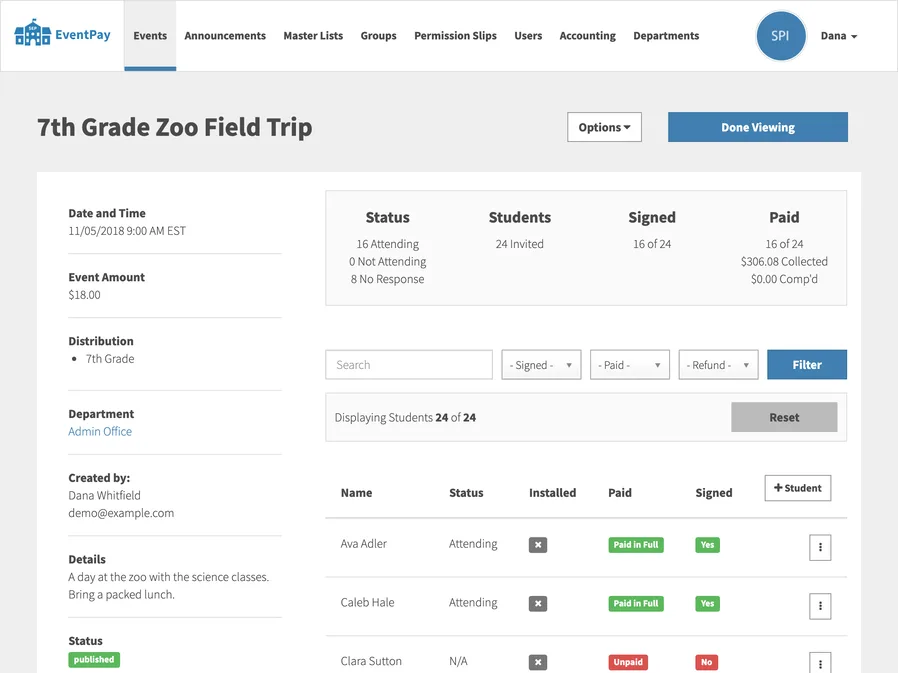
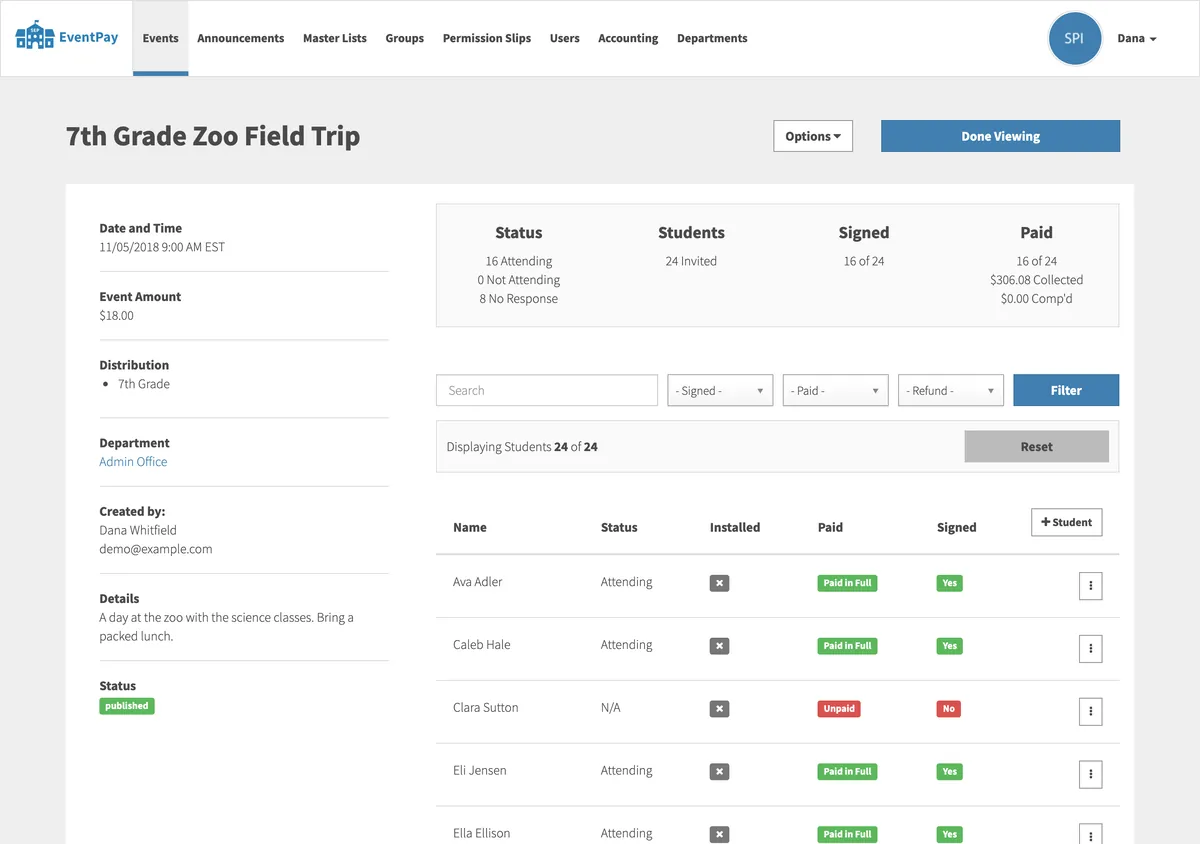
The 7th Grade Zoo Field Trip in the web app, on demo data: $18.00, 16 of 24 students signed and paid, $306.08 collected, above the roster with each student marked Paid in Full or Unpaid.

Three projects for TouchTap · since 2017

  1. 2017No longer runningEquus HubA platform connecting equestrian enthusiasts, on iPhone.Read the case study
  2. 2017 · You’re reading thisSchool EventPayPayments and permission slips for school events, for the web and mobile.
  3. 2018No longer runningMathStarA mobile app that helps kids sharpen their math over the summer break.Read the case study

The brief

Cash and checks from home

Schools collected money for field trips, fees and events in cash and checks sent in from home, with paper permission slips to match. School EventPay set out to move all of it to the parents' phones, and to give the school one place to see who had signed, who had paid and where the money went.

The challenge

The backend, in one summer

The iPhone and Android apps for parents were TouchTap's to build. I had the rest: a web app for school staff, the API the apps talked to, and the money in between, from a school's first bank account to a refund, in time for production at the end of July 2017.

What we made

Three codebases, one database

Three Rails codebases sharing one database: the web app, the mobile API and a shared engine holding the models, the payments and the background jobs, with payments through Stripe Connect and a ledger for every school bank account, which I went on building into 2019.

1 award, 2019

  • Best of Category, Apps – Utility Horizon Interactive Awards Source

The app went on to win this in 2019.

A student holds a phone showing School PayIt’s Confirm Payment screen for a parent teacher conference.
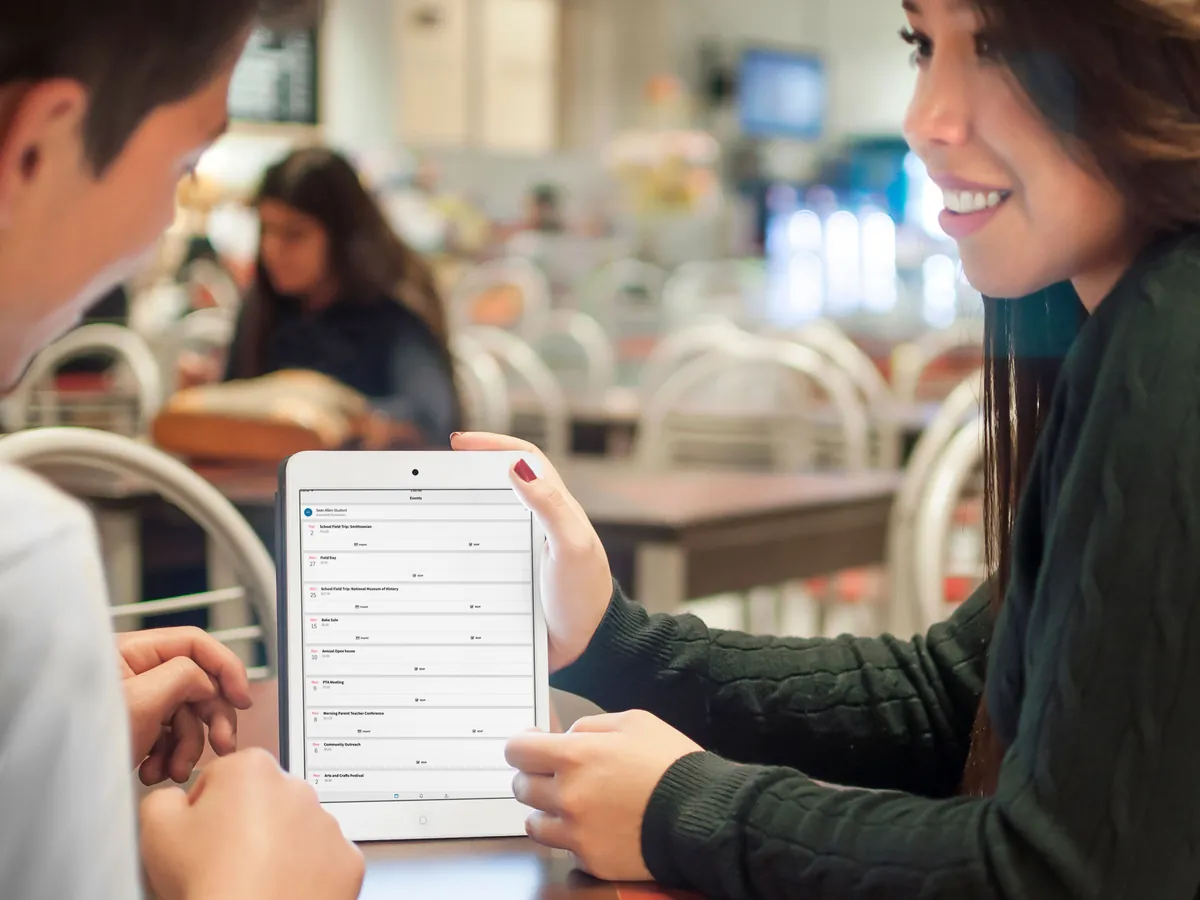
Two students in a cafeteria look at an iPad showing School PayIt’s list of events, such as field trips.

The brief

Cash and Checks From Home

School EventPay started in 2017, as School PayIt, when I took on the work as a contractor through TouchTap. The idea was simple enough to say in a sentence, and the parents’ app said it on its welcome screen: pay for all of your child’s school activities in several easy steps, and you will never need to send cash or checks to school again.

Behind that sentence was a lot of school. A field trip needs a permission slip signed by the right parent, a payment by a deadline and an answer on whether the student is going, and the office needs to see all three for every student on the trip, while the money goes to the right bank account and the bookkeeper can account for every cent of it.

TouchTap’s own developers built the iPhone and Android apps for parents. I built everything they talked to: the web app where school staff set up their school, their students and their events, the API behind the apps, and the payments. The work began in May 2017, and by the end of July the apps were pointed at production.

The parents’ appsiPhone and Android, by TouchTap
School staffin a browser
spi-apiThe mobile API. Queues jobs, never runs them
spi-webThe web app. Runs the migrations and every background job
spi, the shared engineA private gem: the models, payments, notifications, mailers, jobs and migrations, in 335 tagged versions
One PostgreSQL database, one RedisStripe Connect beside them, for every school’s money
How the three codebases fit together: the parents’ apps call spi-api, and school staff use spi-web. Both are built on spi, the shared engine, and share one PostgreSQL database and one Redis. Only spi-web runs migrations and background jobs; spi-api only queues them.

The architecture

Three Codebases, One Database

From the first week, the work was three codebases: the web app, the mobile API as a web service of its own, and a Rails engine holding everything the two had in common. The web app’s first commit was on 11 May 2017, and the API and the engine followed the next day.

The engine is where most of the work lived. It’s a private gem with the models, the payment and fee services, the notifications, the mailers and the background jobs, and even the database migrations, so both apps always agree on what the database looks like. By January 2019 it had been through 335 tagged versions, and each app moved to a new one when it was ready.

Both apps share one production database and one Redis, but only the web app runs migrations when it deploys, and only the web app works the queue of background jobs. The API can put a job on the queue, a push notification or an email, and the web app’s worker picks it up. That kept the API lightweight and quick for the apps, and gave every rule about money exactly one place to live.

The 7th Grade Zoo Field Trip in the web app, on demo data: 11/05/2018 at 9:00 AM, $18.00, for the 7th Grade, in the Admin Office department. A summary reads 16 attending and 8 with no response, 24 invited, 16 of 24 signed, 16 of 24 paid with $306.08 collected, above the roster, where each student is marked Paid in Full in green or Unpaid in red, with Yes or No for signed.

Events

One Event, Every Student

Most of what a school asked of parents was an event: a field trip, a uniform fee, picture day, parent teacher conferences. An event could ask for an answer on whether the student is going, a payment by a deadline, a signed permission slip, or any mix of the three, and it belonged to a department, like the front office, athletics or the band, each with its own staff and the bank account its money went to.

School staff sent an event to one of the school’s lists or groups, like the 7th grade or the cross country team, and publishing it gave every student on it their own record for that event, holding their family’s answer, signature, payment and any refund. That’s the roster on each event’s page, and it stayed live: add a student to a group later, and they’re added to its events too.

The families came from the school’s own records. Staff imported a spreadsheet of students and their parents, watching its progress live, and parents then activated the accounts the school had made for them, so nobody had to type in a student body by hand, and a parent only ever saw their own children.

A person at a laptop in a classroom fills in the web app’s Add Student form, from when it was School PayIt.
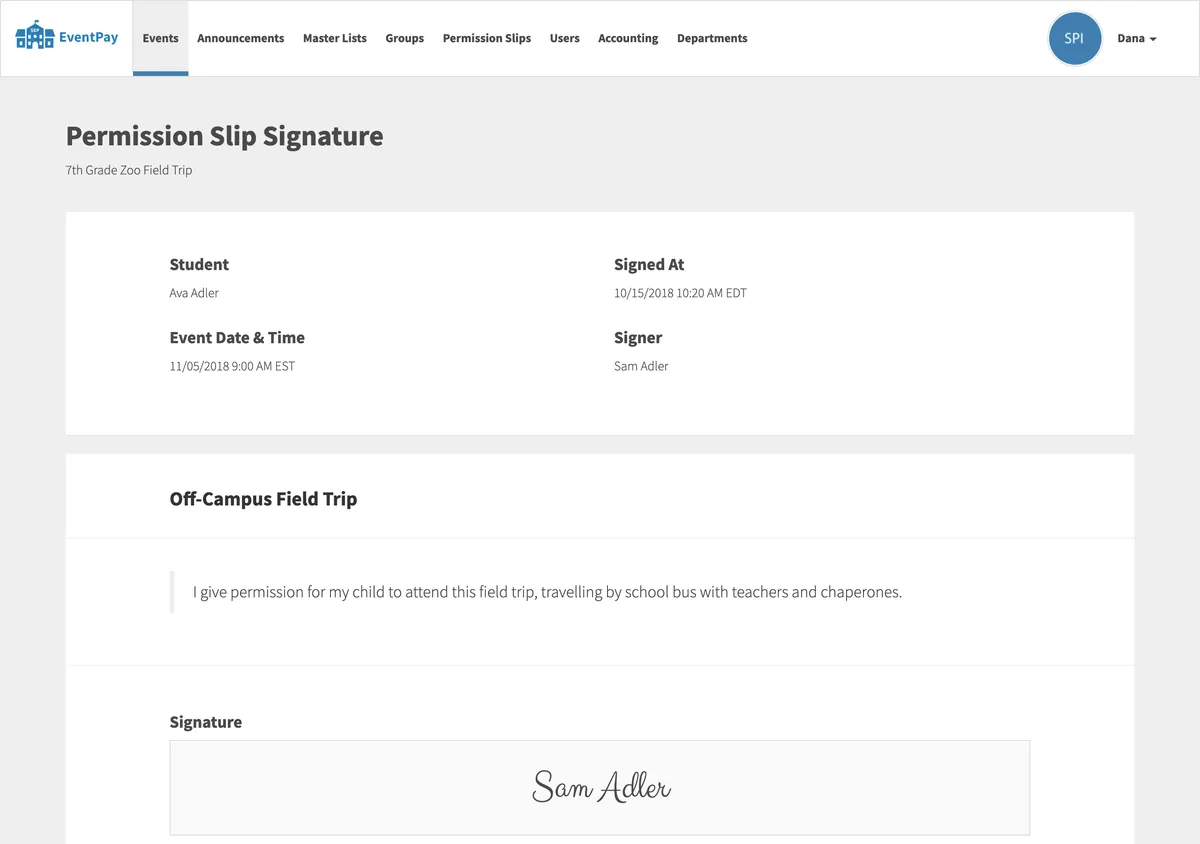
A permission slip signature in the web app, on demo data: Ava Adler’s slip for the 7th Grade Zoo Field Trip, signed by Sam Adler, with the slip’s text, I give permission for my child to attend this field trip, travelling by school bus with teachers and chaperones, and the signature, Sam Adler, set in a handwriting font.

Permission slips

Signed on a Phone

A school wrote its permission slips once, as templates, with an optional PDF to read, and attached one to any event that needed it. A parent signed it in the app by typing their name, under a line confirming they were the student’s parent or guardian, and the office saw it set in a handwriting font, with who signed it and when.

The order mattered. If an event needed a signed slip, the app asked for the signature before it would take a payment, and a parent who later changed their answer to not attending had their signature taken back with it, so the roster never showed a signed slip for a student who wasn’t going.

Not every adult in a student’s life could do everything, either. A parent could invite other adults to pay for a student, and choose whether they could sign slips as well.

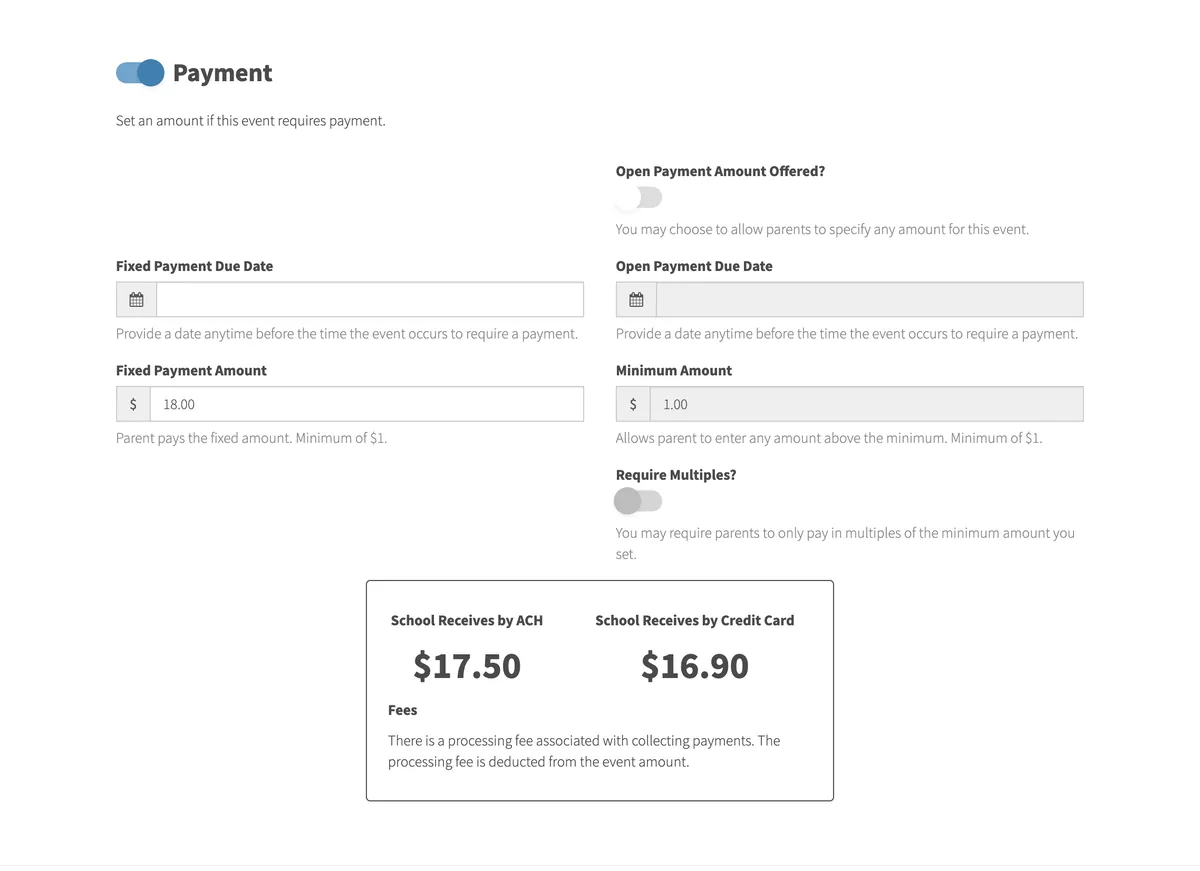
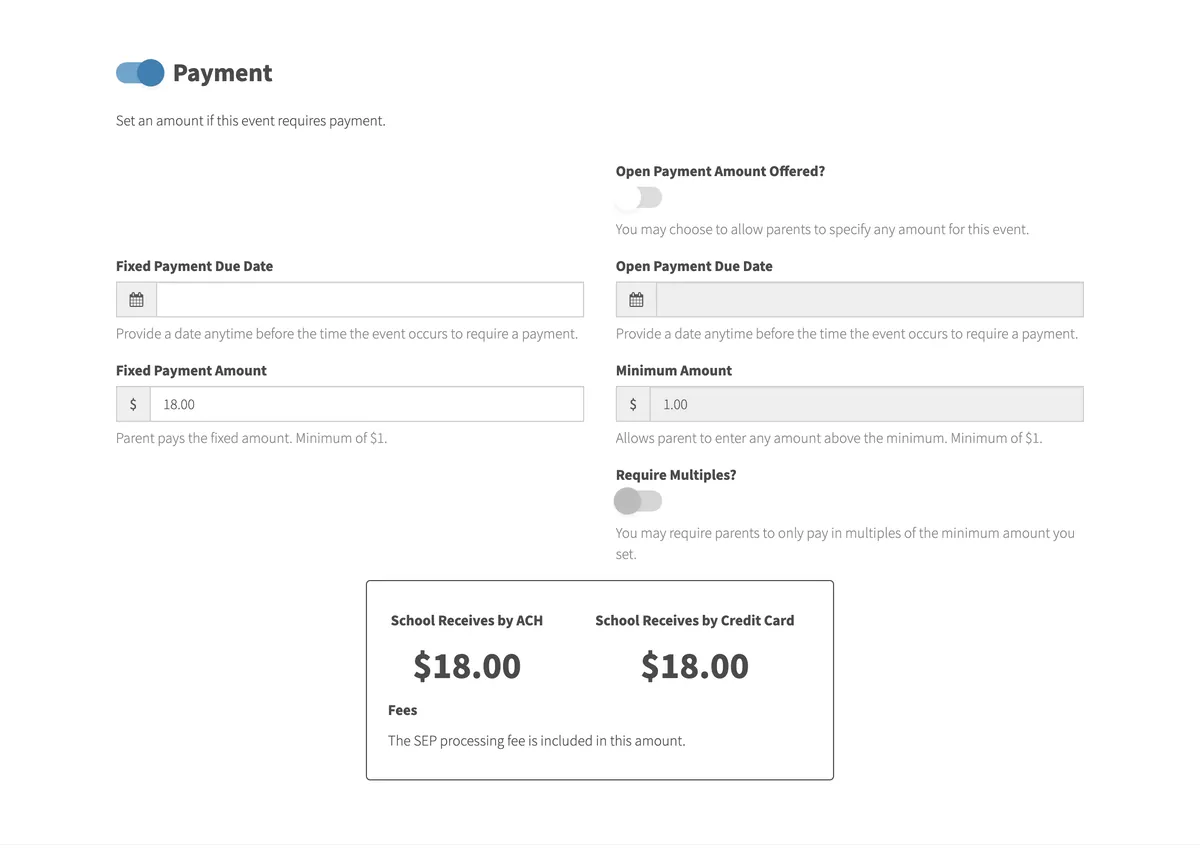
The Payment section of the web app’s New Event form, on demo data, for a department whose account includes the fee in the price: a Fixed Payment Amount of $18.00 and, below it, School Receives by ACH $17.50 and School Receives by Credit Card $16.90, with a note that the processing fee is deducted from the event amount. The same Payment section for a department whose account doesn’t include the fee in the price: a Fixed Payment Amount of $18.00, and School Receives by ACH $18.00 and School Receives by Credit Card $18.00, with a note that the processing fee is included in this amount.

The fee

Who Pays the Fee

Every payment carried a processing fee: Stripe’s, for moving the money, and a small share for EventPay, for running the platform, with a minimum on the two together. A card cost more to take than a bank payment, so the fee depended on how the parent paid.

Each school chose, for each of its bank accounts, who paid it. If the fee was included in the price, the parent paid the price and the school received it less the fee. If it wasn’t, the fee went on top, and that’s the harder sum, because a card fee is a share of the whole charge, the fee itself included. I adapted Stripe’s own formula for passing its fee on, so the school received exactly the price it set, and the New Event form showed staff what they’d receive either way before they published.

These are the app’s own sums, rounded to the cent as it rounded them, as they stood from September 2018 on. Try a price.

For an $18.00 field trip, with the fee included in the price, the school received $17.50 from a bank payment, where the 50¢ minimum applied, and $16.90 from a card. With the fee on top, the parent paid $18.50 by bank, or $19.13 by card, and the school received the whole $18.00 either way.

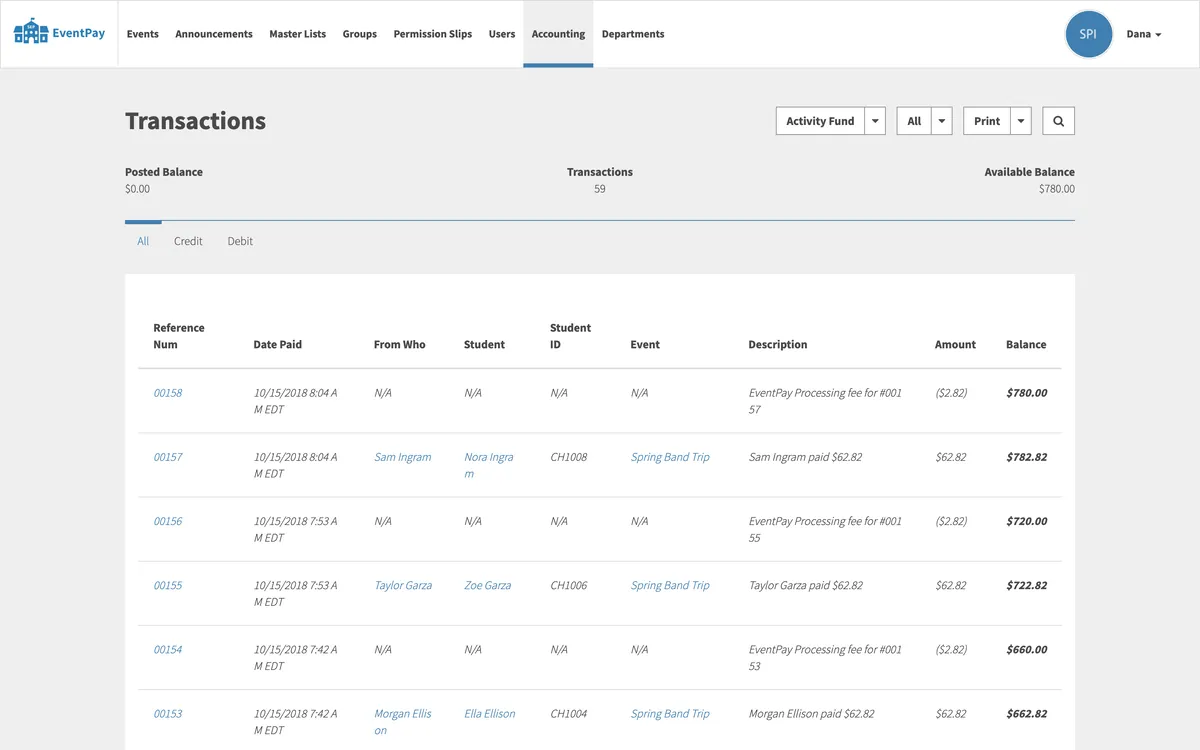
The Transactions page for the Activity Fund bank account, on demo data: a posted balance, 59 transactions and an available balance of $780.00, above a ledger with reference numbers 00153 to 00158, each payment, such as Sam Ingram paid $62.82 for Nora Ingram’s Spring Band Trip, followed by an EventPay processing fee of ($2.82), with a running balance.

The books

A Ledger for Every Bank Account

Every school had its own Stripe account, made for it when it added its first bank account, and every payment went straight to the school, with the fee taken on the way. But a bookkeeper needs more than a list of payments, so every bank account a school added got a ledger of its own: every payment, every fee, every refund and every deposit, each with a reference number and a running balance.

The ledger was written from Stripe’s side, not the app’s. When Stripe told the web app a payment had gone through, or a fee had been taken, the app asked Stripe for that event again rather than trusting the message, and recorded it once, keyed by Stripe’s own ID, so a message delivered twice could never be recorded twice.

Money in Stripe isn’t in the bank straight away, and the ledger said so. Each entry stayed pending until the day Stripe said its funds would be available, and then posted. Every day the app paid out whatever had posted to the school’s bank as a deposit, one for card payments and one for bank payments, because Stripe kept those apart, and each deposit remembered exactly which entries it paid out.

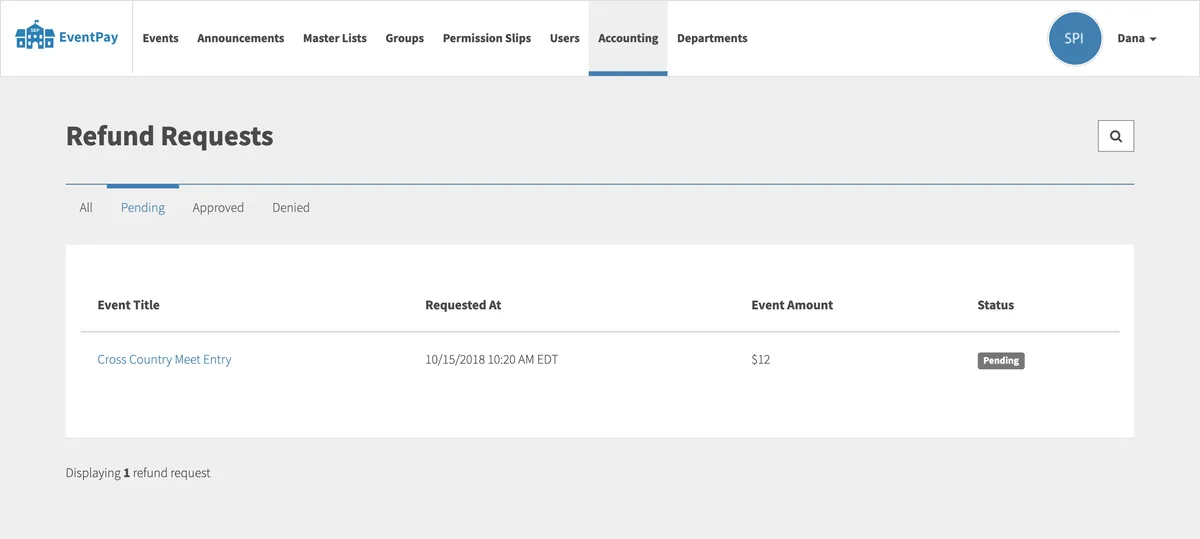
The Refund Requests page in the web app, on demo data, showing pending requests: one, for the Cross Country Meet Entry at $12, requested on 10/15/2018 and marked Pending.

Refunds

Refunds, With the Money Behind Them

A parent could ask for a refund in the app, with a reason, and every accountant at the school was emailed. An accountant or administrator approved it, with notes, or turned it down, and the parent heard either way. A refund gave back everything the parent had paid, the fee included, and came back out of the school’s balance, as its own line in the ledger.

Because the deposits went out every day, a school’s balance could be smaller than a refund, and a refund can’t be paid from money that’s already in the school’s bank. So a refund could only be approved when the account’s balance could cover it, and the web app said so when it couldn’t.

Canceling an event did all of it at once: it told every family, and made a refund for every student who’d paid.

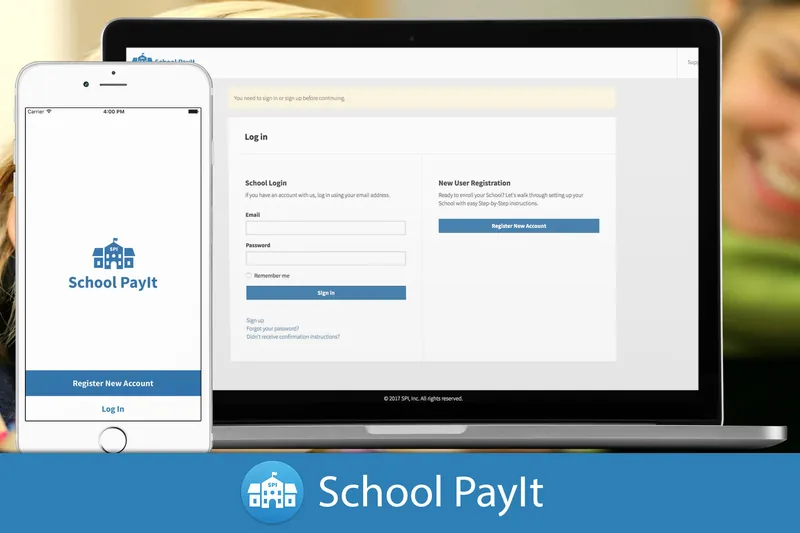
School PayIt, The Simple Solution: the app’s schoolhouse icon on a phone, on blue.
Watch the School PayIt filmFrom before the rename, on Vimeo
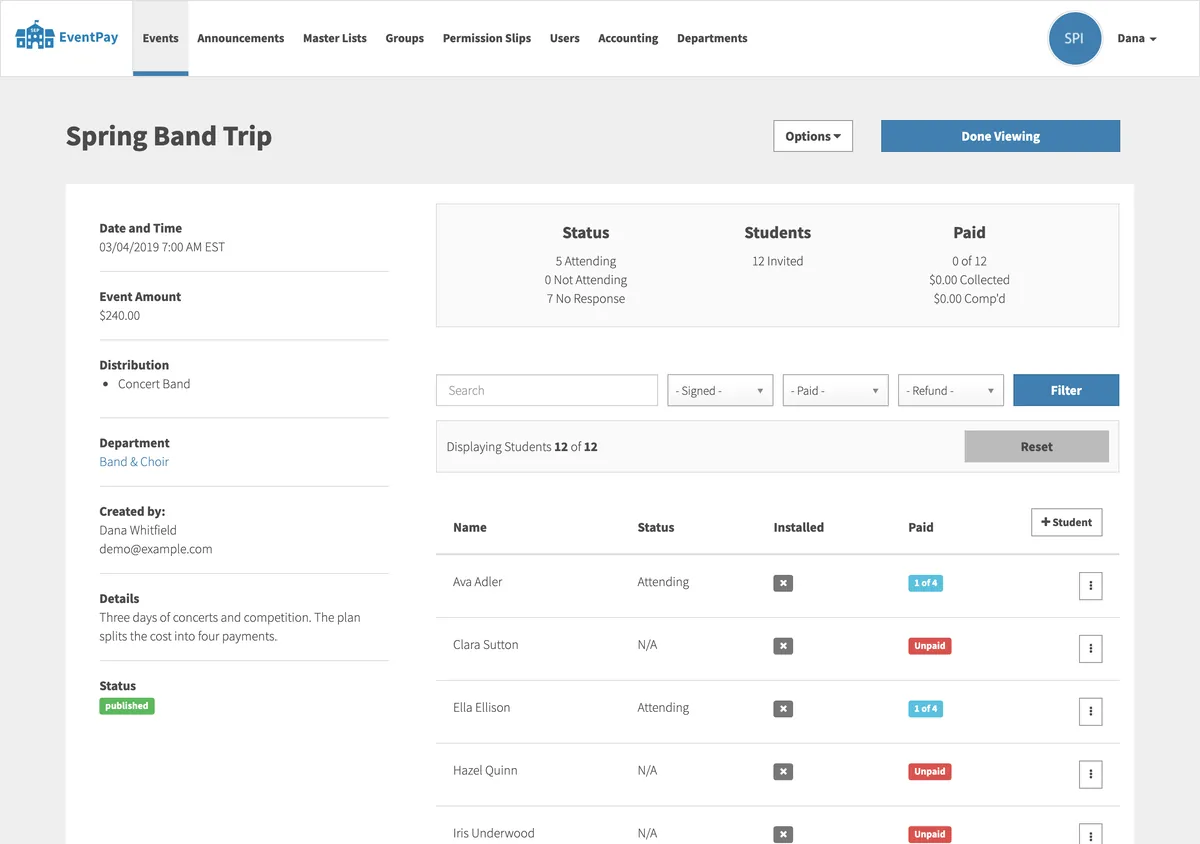
The Spring Band Trip in the web app, on demo data: $240.00 for the Concert Band, in the Band & Choir department. On the roster, students on the payment plan are marked 1 of 4 in blue, and the others Unpaid in red.

After launch

Two More School Years

Launch was the start. That fall I added canceling an event with automatic refunds, and a way for parents to invite a school that wasn’t on it yet, and by December an internal tool for the company to look after the schools signing up. Each school’s year was already built in: promoting its master list rolled it over to the next school year, and students who had left were kept on as donors.

In February 2018 School PayIt was renamed School EventPay, with a new logo on the same schoolhouse, and “EventPay” on the phones. Along the way, the work moved from TouchTap to a company set up for the product, and I took over the contract directly, with TouchTap no longer involved. In April 2018, one login began to cover a family across more than one school, so a parent could switch between children at different schools.

Payment plans came next, in May and June 2018. A school could split an expensive trip into installments, each with its own due date; a parent paid the first to start the plan, and the rest were charged automatically on their dates, with a reminder the day before. That fall, events could let parents pay any amount above a minimum, or buy several at a set price.

“Great company! Good communication. Keeps projects on schedule. Passionate about what they do. Knowledgeable. Experienced. Honest. Easy to work with.”

Ethan, Founder of School PayIt

The Craft

Tested, then deployed

By 10 October 2017 the three codebases had 2,336 commits between them, and by the end there were about 1,800 RSpec tests across them, including browser tests of the web app driven through Chrome. Every change that passed its tests on Codeship went out to Heroku on its own.

Work on a schedule

Much of the product ran on its own in Sidekiq, in queues weighted so payments came first: charging the installments due that day, reminding parents the day before, warning about cards about to expire, sending an event’s reminders on the minute, and making each day’s deposits.

A login that knows the child

The apps signed in with a token that carried not only the parent, but the school and the child they were acting for, so every request answered for the right student. Switching to another child, even at another school, meant asking for a new token, and a push notification about one child switched the app to that child first.

Roles for every office

School staff could be administrators, accountants, department heads or event managers, and each saw only what their role allowed: a department head their department’s events, an event manager only the events they made, and the accountants the refunds and the money.

More for TouchTap

Three projects for TouchTap

All the client work

2017 to 2018

  1. 2017 No longer runningEquus HubA platform connecting equestrian enthusiasts, on iPhone. Read the case study
  2. 2017
    School EventPayPayments and permission slips for school events, for the web and mobile. You’re reading this
  3. 2018 No longer runningMathStarA mobile app that helps kids sharpen their math over the summer break. Read the case study