Our own app · 2026

Flipcorder

Snap your day onto one tape.

A retro camcorder for iPhone, made for iPhone Duo. Little 20-second snaps through your day become one home video by tonight. $4.99, once, from October 23, 2026.

I built
iPhone App
With
Swift, SwiftUI, AVFoundation, Metal, WidgetKit
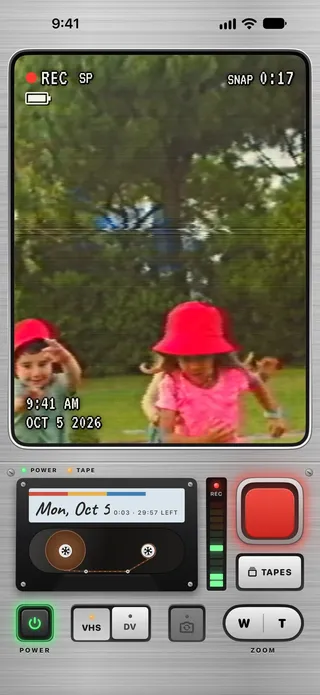
Flipcorder recording on iPhone: the viewfinder reads REC SP and SNAP 0:17 over children running in a park, dated OCT 5 2026, above the brushed-metal deck with the cassette labelled Mon, Oct 5, 29:57 left, and the big red key.
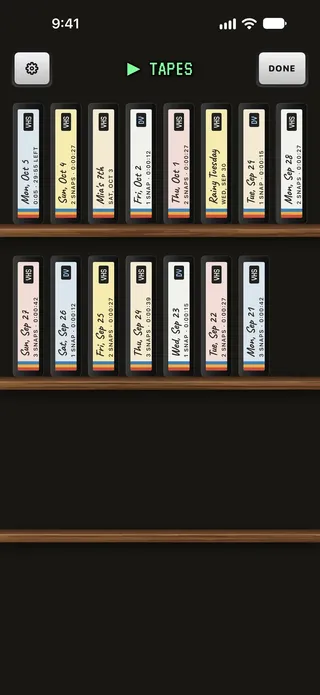
The tape shelf: two wooden shelves of cassettes standing spine-out, each labelled by hand with its day or a name, its snaps and its running time.
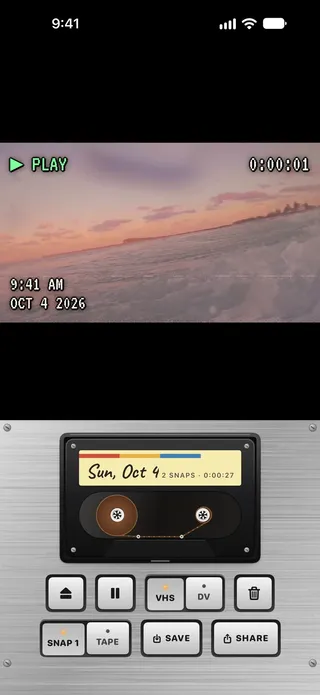
A tape playing back: PLAY over a sunset sea, with Sunday's cassette, 2 snaps, in the player above its keys.

The brief

A 1991 camcorder in your pocket

Flipcorder is a retro camcorder for iPhone, made for iPhone Duo. You film little 20-second snaps through your day, they land on that day's dated tape, and by tonight they play back as one home video. It's $4.99, paid once, and it comes out on October 23, 2026, the day iPhone Duo does.

The Idea

A fold that switches it on

iPhone Duo folds, and a camcorder's screen flips out, so the fold could be the power switch: open the phone and the camcorder warms up, open it all the way and the person you're filming sees themselves on the outside screen. Then it had to work just as well on every iPhone that doesn't fold, and give people a reason to come back to it every day.

What I Built

Snaps on a day tape

A camcorder you operate rather than a filter list: a big red key, cassettes with handwritten labels, a shelf of days, and two looks, VHS and MiniDV, drawn live in the viewfinder. Each snap stops by itself at 20 seconds, every day gets a 30-minute tape, and tonight the tape saves to Photos as one movie that opens on a title card.

I wanted to build an app purpose-built for the iPhone Duo at launch, and I’m just old enough to miss some of the charm from older tech. I explored a few ideas before realizing that a camcorder app would be perfect for the new iPhone Duo.

Why Flipcorder exists
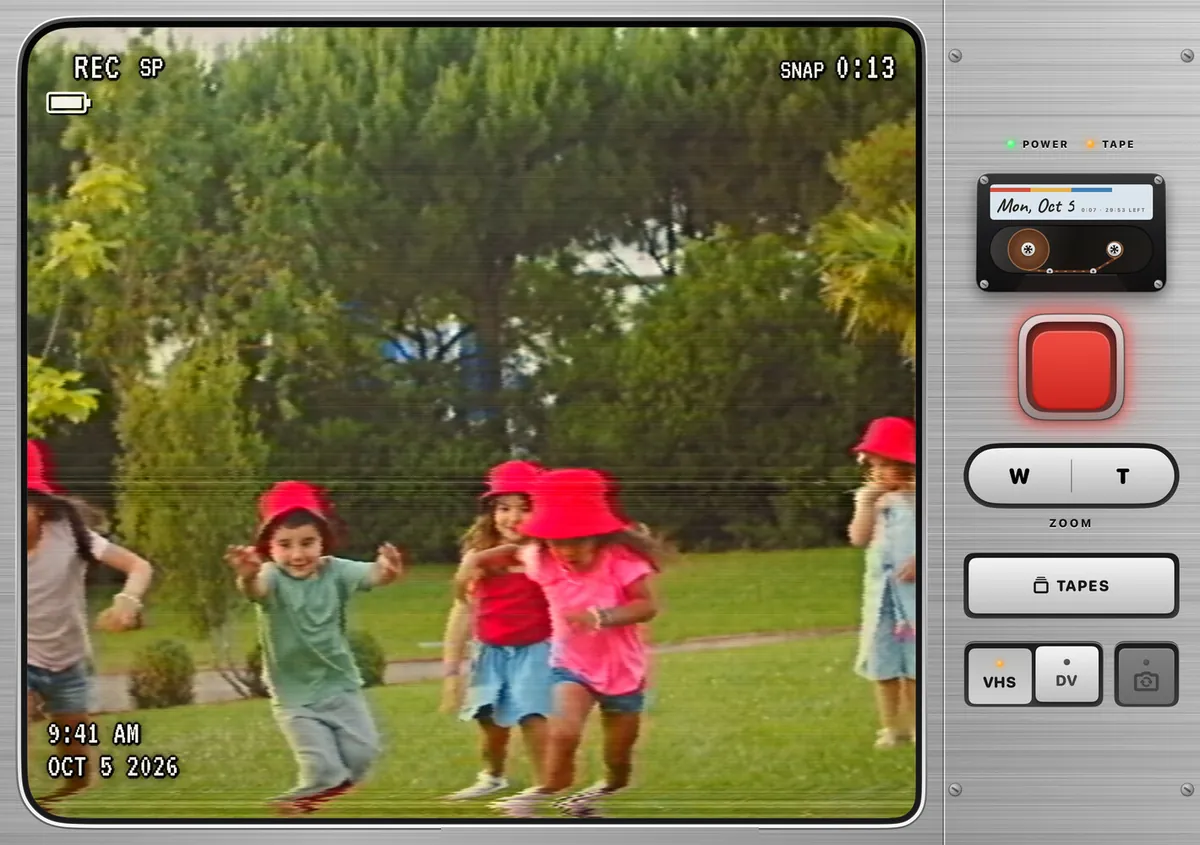
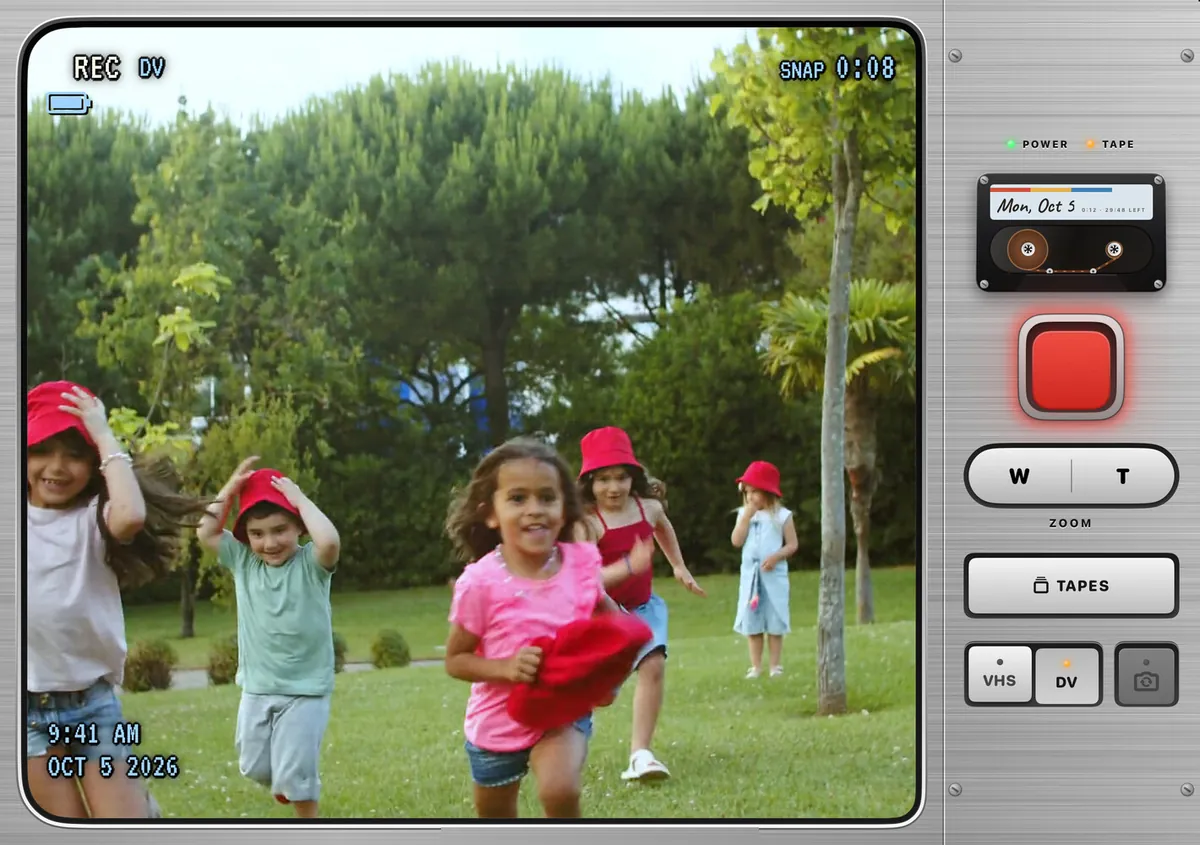
Flipcorder on the inside screen of iPhone Duo, in the simulator: a wide viewfinder reading REC SP and SNAP 0:13 over children in red hats running across a lawn, with the deck down the right-hand side, the cassette, the big red key, the zoom rocker, TAPES and the VHS and DV keys.
In the iPhone Duo simulator

A Camcorder You Open

The idea started from one line in the spec: open your iPhone Duo and it becomes a 1991 camcorder. A camcorder’s screen flips out to the side before you film, and the Duo opens the same way, so the fold could simply be the power switch, with the camera warming up as the phone opens and powering down, with your snap saved first, as it closes.

The app reads the hinge through UIKit, and it turns on at 30 degrees and off again only at 10 or below, so a phone held half open in a loose hand doesn’t flicker between the two. How fast the hinge moves feeds the picture too, and a quick snap open shows up as a little tracking glitch, as an old tape would.

The harder decision was who it was for. Nothing in Xcode lets an app say it only runs on a phone that folds, and an app that only really works on one phone invites refunds and a rejection from App Review, so I decided early that it would work on every iPhone, with the Duo as the best place to use it. On any other iPhone a glowing POWER key does the fold’s job, and if the app hasn’t heard from a hinge within a second, it shows that key instead.

I didn’t have an iPhone Duo to test on, so the fold was built against Apple’s simulator, which is where every Duo picture on this page comes from, while I used the app itself on my iPhone 16.

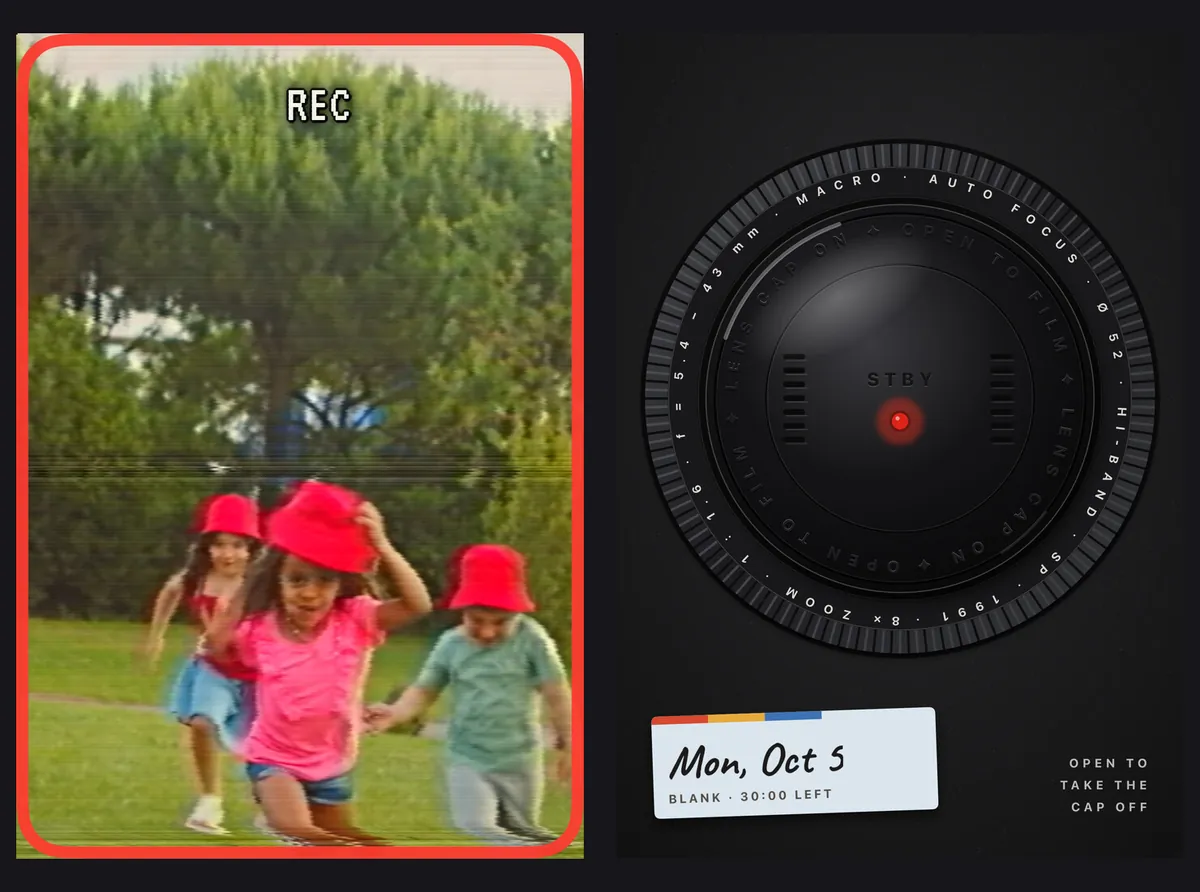
iPhone Duo’s outside screen, in the simulator, two ways. Open: the person being filmed sees themselves running across the lawn, under a REC light in a red frame. Closed: a camera lens cap in standby, ringed with lens markings, with a cassette label for Mon, Oct 5, blank, 30:00 left, and the words ‘Open to take the cap off’.
In the iPhone Duo simulator

The Screen on the Outside

Open all the way, iPhone Duo has a second screen facing the person you’re filming, and Flipcorder shows them themselves on it, mirrored, in the same look as the viewfinder, with a REC light so they know when to wave. It goes through Apple’s new camera accessory API, and the app only sends frames while iOS says that screen is there to show them.

Closed, the outside screen was a harder problem. My first try was a shrunken version of the camcorder, and on that small screen it was cramped and useless, so I picked a different idea from a set of mock-ups: a lens cap. It sits there in standby with the day’s tape label under it, and tells you to open the phone to take the cap off.

The part of the build I’m proudest of is the attention to detail in that lens cover, and the Easter egg that goes with it, where every so often you’ll have forgotten it and need to take off the lens cover that was left on. It turns up one power-on in forty, never in your first ten and never with Reduce Motion or VoiceOver on, and I wanted it for the same reason as the cap itself, to bring some whimsy and realism to an app that is true to form.

The same scene in the MiniDV look on iPhone Duo’s inside screen, in the simulator: crisper and cooler, with a blue-tinted display reading REC DV and SNAP 0:08 over the children running on the lawn.
In the iPhone Duo simulator

Record Clean, Style Later

My first plan was to bake the look into the video as it was recorded, so what you saw in the viewfinder was exactly what landed on the tape, and exporting would be quick. I changed that the same day, because I wanted the clean HD footage to be there too, for anyone who wants the moment without the nostalgia.

So every snap is recorded clean, in 1080p, with a small file beside it that remembers the look, the date stamp and the tracking wobble ten times a second. The look is then drawn live, on the viewfinder and on playback, by a Metal shader on the phone’s graphics chip, and drawn again on export, wobble and all, exactly as it was when you filmed.

VHS gets 480 lines, colour that bleeds a little to the right, a rolling tracking band, head-switching noise along the bottom and a warm, faded tone. MiniDV is sharper and cooler, with the faint blockiness of early digital tape. The on-screen display, REC and the counter and the date, is drawn on top rather than through the shader, so the words stay crisp while the picture underneath goes soft. With Reduce Motion or Reduce Effects turned on, the whole look eases back to about a third of its strength.

The day tape

Snaps, Not Footage

What surprised me, as I built the app and used it myself on my iPhone 16, was the joy it brought me: the thunks and the sounds, and the filter itself, but also the joy of an unedited video of my day. So I explored leaning into that more, by limiting how long a snap can run and how long the cassette tape itself is.

The first version had no limits at all, so a recording ran until someone remembered to stop it, and a day’s tape could grow without end. On the third day of the build I changed the whole shape of it: every recording is now a snap that stops by itself at 20 seconds, with a calm countdown and no beeps, and every day gets one tape that holds 30 minutes, the way a VHS-C cassette did from 1989, around the time this camcorder is set.

What I built in the end feels like a throwback in a way, but also an entirely new way to focus on capturing those small moments in your day and enjoying them in a delightful new way, without the pressure of creating the perfect viral hook or impressing friends on social media. Anyone who wants a long take can still set Snap length to No limit, at the same price, with nothing to unlock, and then the only limit left is the tape.

The tape’s rules are small and strict. A take runs for 20 seconds or whatever is left on the tape, whichever is shorter, so a snap that runs into the end is cut short and saved, never lost. The display stays quiet until the last five minutes, and a fresh tape loads at midnight. Try it: these are the app’s own rules and the label’s own words.

0 snaps on today’s tape: Blank · 30:00 left.

  • Blank · 30:00 leftA fresh tape, every midnight.
  • 25:00 · 5:00 left75 snaps in, the display starts counting what’s left: REMAIN 5 MIN.
  • 30:00 · fullTAPE END. A snap that runs into the end is cut short and saved, never lost.
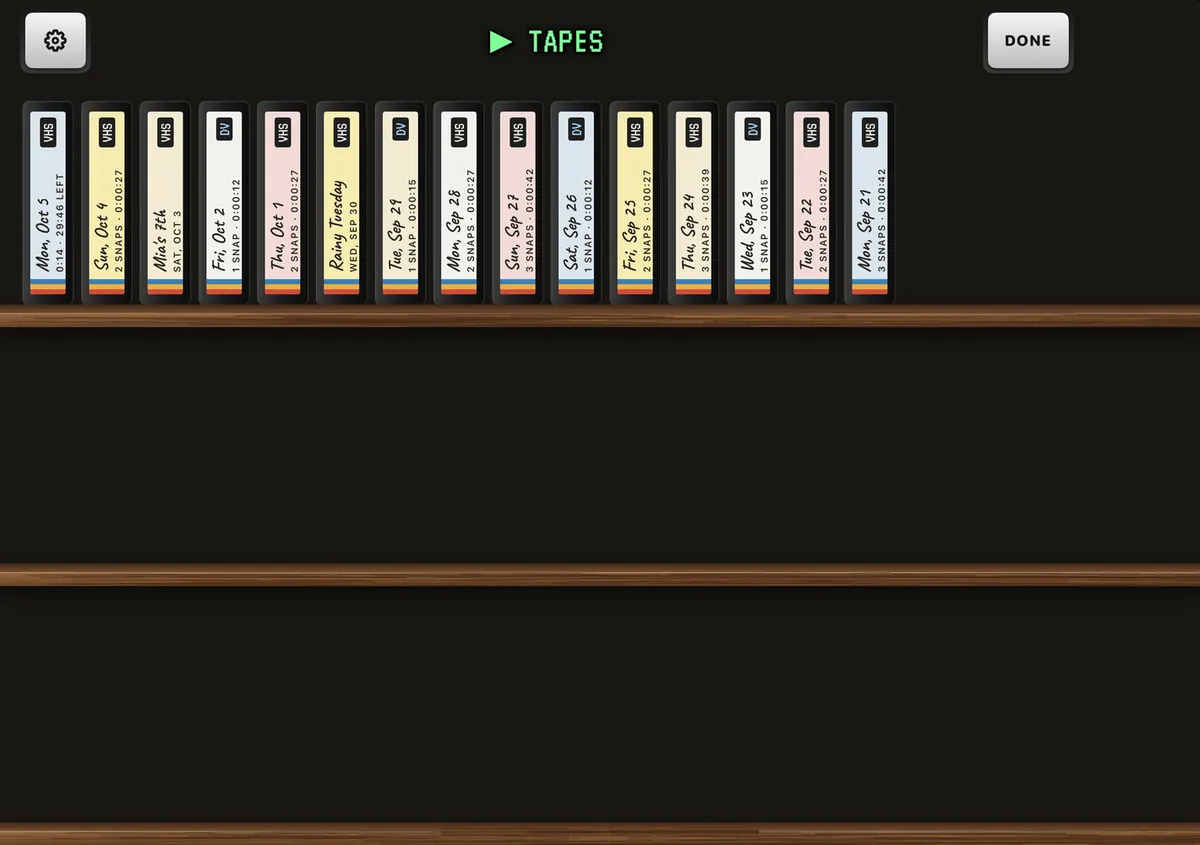
The tape shelf on iPhone Duo’s inside screen, in the simulator: fifteen cassettes standing spine-out on the top shelf, each with a VHS or DV sticker and a handwritten day or label, from Mon, Oct 5 back to Mon, Sep 21, with a Settings gear and Done.
In the iPhone Duo simulator

A Shelf of Days

Every day’s snaps live in a folder named for that day, and each folder is a tape on the shelf, standing spine-out with its day written on the label by hand, its snap count and its running time. A snap belongs to the day it started, even one that runs past midnight.

A lot of the care went into making the tapes feel like objects. Tap a spine and the cassette flies off the shelf, turns and drops into the deck, the deck has a door, the reels coast to a stop rather than halting, and deleting a tape crunches it. Every label paper is checked against every ink at 4.5:1, so the handwriting stays readable on all five colours.

On the Home Screen, a widget shows today’s tape as a cassette with one of today’s snaps showing through its window. A widget can’t read the app’s tapes, so the app keeps a small copy of today’s snaps in a shared folder on the phone for it, and the pictures can be switched off in the settings.

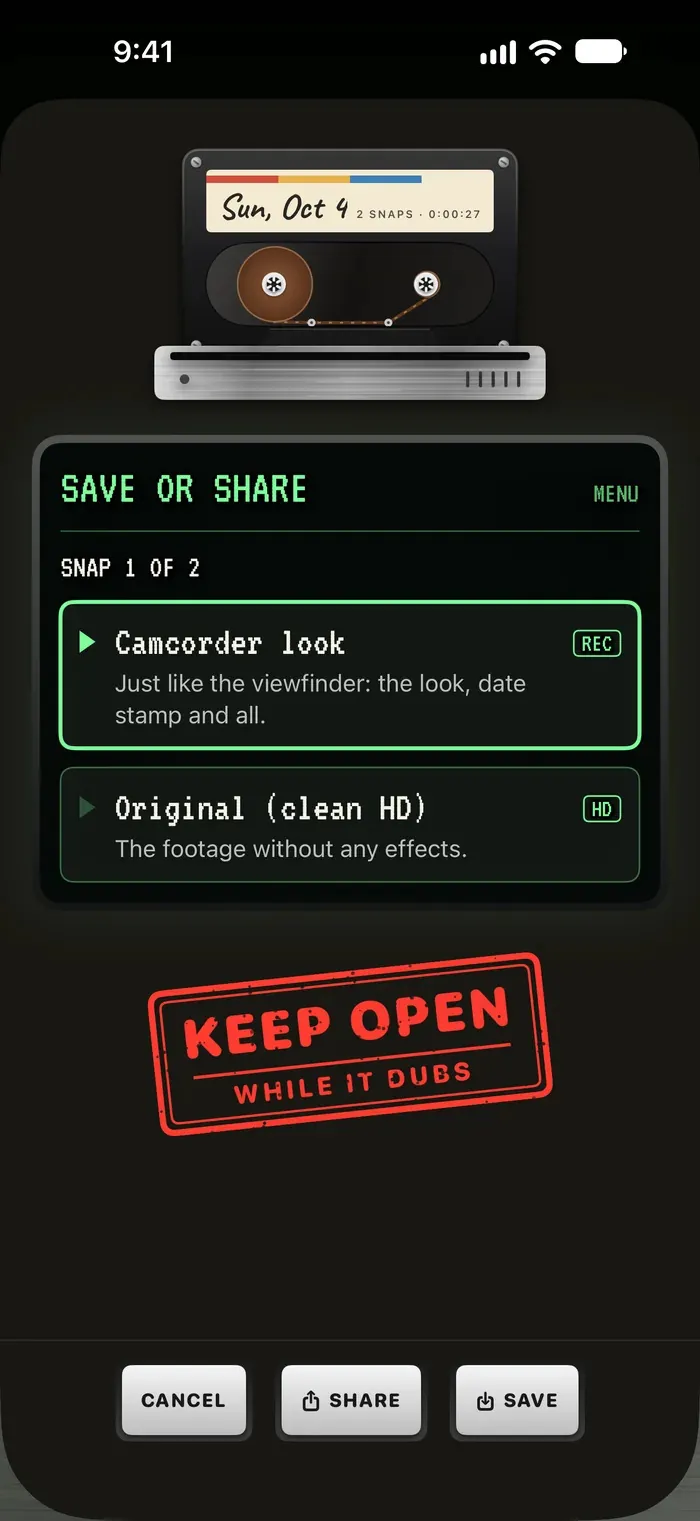
Flipcorder’s Save or Share menu on iPhone: Camcorder look, just like the viewfinder, the look, date stamp and all, or Original (clean HD), the footage without any effects, under the cassette in the deck, with a red rubber stamp reading Keep open while it dubs.

From Tape to Movie

Tonight’s payoff is the tape as one movie, which opens on a two-second title card, plays every snap back to back, and ends on a card where the cassette ejects, all saved to Photos, which the app can add to but never read.

In the camcorder look, every frame goes back through the same shader the viewfinder uses, with the date stamp and the recorded tracking wobble replayed, and the tape’s sound is mixed with the eject at the end. The clean HD version skips the shader entirely and copies the footage as it is. Both are dubbed, in the app’s own word, and the last dub of each tape is kept, so saving it again or sharing it straight afterwards doesn’t mean waiting twice.

A quick tape can dub in a moment, but I wanted it to feel like something was happening, so the dubbing screen always stays up for at least two and a half seconds, even when the tape was finished long before that.

The Body, Redesigned

Everything on the camcorder is drawn in code: the brushed metal, the keys, the cassette, the level meter, the iris that opens over the viewfinder when it powers on, with seven blades, and the lens cap. That kept every asset ours, with no real camcorder’s or tape maker’s look borrowed, and it meant the body could change quickly, which it needed to. Looking at an early build on my phone, the keys weren’t the same size, the viewfinder seemed to float, and the metal didn’t feel real enough, so six versions of the body were built in code and I put together the best parts of three: one faceplate, a cut-out for the viewfinder that looks machined, and a trim ring around it. Every key now sits on the same plate, and the big red key is the only one larger than the rest. Landscape got its own pass after that, when the column of controls turned into a mess, and the controls became a grip.

When It Broke on a Real Phone

The simulator never showed the worst bug. On the third build on my own iPhone, the camera froze and the app said it was busy, and the diagnostics said another client was using the camera. That other client was the app itself: SwiftUI had quietly rebuilt the camcorder’s view, the discarded copy had started a second camera session, and the two took the camera from each other, again and again, every time the app tried to recover.

The fix was to make the camcorder’s session once and only once, and to add a guard that stops a development build dead if two cameras ever run at the same time, so it can’t creep back unnoticed. Hosted build machines had a surprise of their own, with no hardware video encoder to record a test video with, so the tests run on a Mac Studio instead.

The Craft

Privacy

There are no accounts, no analytics and no servers. Your videos stay on your phone until you save or share them. Reminders are ordinary notifications scheduled on the phone, off until you turn them on. The only thing the app ever sends is a report when it crashes, which isn’t linked to you, and when an early version turned out to send more than crashes, I cut it back to fatal crashes alone.

Accessibility

Every main screen goes through Xcode’s accessibility audit before a change is merged. The camcorder’s display text keeps its size and offers the Large Content Viewer, while the rest of the app follows Dynamic Type, and VoiceOver hears when five seconds are left in a snap, and which snap of the tape is playing. Reduce Motion stills the iris and the lens cap and softens the looks.

Tested where it counts

It’s Swift and SwiftUI, with the logic split into small packages, the power switch and the tape’s rules among them, written as plain functions that are easy to test. There are more than 400 tests, 83 of them driving the app itself through a mock camera, and the shader’s own tests check that each look draws the same frame every time for the same input, and that it visibly changes it.

One price

Flipcorder is $4.99, paid once, with no subscription, no in-app purchases, no watermark and no ads. The snap and the tape are how the camcorder works for everyone, not a paywall, and long takes are one setting away.